
- July 28, 2026
- Posted by: admin
- Category: Blog
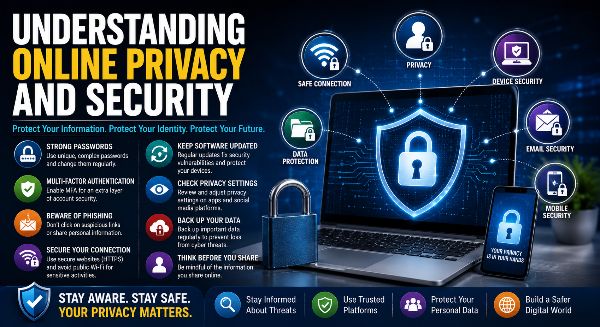
In today’s connected world, almost every aspect of our lives takes place online. We shop, bank, study, work, communicate, and entertain ourselves using digital platforms. While the internet offers convenience and endless opportunities, it also exposes users to privacy risks and cybersecurity threats. Personal information, financial data, browsing habits, and even location details can become targets for cybercriminals if not properly protected.
Understanding online privacy and security is essential for everyone—from students and professionals to entrepreneurs and businesses. By adopting safe digital practices and staying informed about emerging cyber threats, you can protect your personal information and enjoy a safer online experience.
What Is Online Privacy?
Online privacy refers to your ability to control how your personal information is collected, stored, used, and shared when using digital platforms.
Personal information includes:
- Name
- Email address
- Phone number
- Home address
- Financial details
- Location data
- Browsing history
- Social media activity
Protecting this information helps prevent misuse and unauthorized access.
What Is Online Security?
Online security involves the technologies, tools, and practices used to protect devices, accounts, networks, and digital information from cyber threats.
Online security includes:
- Password protection
- Device security
- Secure internet browsing
- Antivirus software
- Firewalls
- Data encryption
- Secure authentication
- Safe online transactions
Strong security measures reduce the risk of cyberattacks and data theft.
Why Online Privacy and Security Matter
Every day, people share large amounts of personal information online. Without proper protection, this information can be exploited by hackers, scammers, or malicious software.
Protecting your privacy and security helps you:
- Prevent identity theft
- Protect financial information
- Secure personal accounts
- Maintain digital privacy
- Reduce cyber risks
- Protect business data
- Build confidence online
- Avoid online fraud
Responsible digital habits make the internet safer for everyone.
Use Strong and Unique Passwords
Passwords are your first line of defense.
Create secure passwords by:
- Using at least 12–16 characters
- Combining uppercase and lowercase letters
- Adding numbers and symbols
- Avoiding personal information
- Using different passwords for every account
- Updating passwords regularly
Password managers can securely store and generate strong passwords.
Enable Multi-Factor Authentication (MFA)
Multi-Factor Authentication adds an extra layer of security by requiring additional verification beyond a password.
Common MFA methods include:
- Authentication apps
- SMS verification
- Email verification
- Fingerprint authentication
- Face recognition
- Hardware security keys
MFA greatly reduces the chances of unauthorized account access.
Be Aware of Phishing Scams
Phishing attacks attempt to trick users into revealing confidential information.
Common phishing methods include:
- Fake emails
- Fraudulent websites
- SMS scams
- Fake customer support
- QR code scams
- Social media impersonation
Always verify links and sender identities before sharing personal information.
Protect Your Personal Information
Avoid sharing unnecessary personal details online.
Limit the public visibility of:
- Phone numbers
- Home addresses
- Financial information
- Identity documents
- Travel plans
- Workplace details
The less personal information available publicly, the lower your exposure to cyber threats.
Browse Securely
Safe browsing habits significantly improve online security.
Always:
- Visit HTTPS websites
- Verify website authenticity
- Avoid suspicious downloads
- Ignore unexpected pop-ups
- Use trusted software sources
Secure browsing protects your devices and personal information.
Keep Software Updated
Software updates often fix newly discovered security vulnerabilities.
Update regularly:
- Operating systems
- Browsers
- Mobile apps
- Antivirus software
- Smart devices
- Productivity software
Automatic updates provide continuous protection against evolving threats.
Secure Your Devices
Every internet-connected device should be protected.
Security measures include:
- Device passwords
- Screen locks
- Biometric authentication
- Antivirus software
- Firewalls
- Device encryption
Proper device security helps prevent unauthorized access.
Understand Privacy Settings
Many websites and social media platforms allow users to control how their information is shared.
Review privacy settings to:
- Limit profile visibility
- Control app permissions
- Manage location sharing
- Restrict targeted advertising
- Review connected applications
Regular privacy checks improve digital safety.
Practice Safe Social Media Habits
Social media users should remain cautious about what they share.
Best practices include:
- Accept requests only from trusted people
- Avoid oversharing
- Enable account security features
- Report fake accounts
- Review privacy settings regularly
Responsible social media use protects your digital identity.
Use Secure Wi-Fi Networks
Public Wi-Fi networks often lack adequate security.
When using public Wi-Fi:
- Avoid online banking
- Use a Virtual Private Network (VPN)
- Disable file sharing
- Log out after use
- Avoid accessing confidential business information
Secure connections help protect sensitive data.
Backup Your Important Data
Regular backups reduce the impact of cyberattacks and hardware failures.
Backup options include:
- Cloud storage
- External hard drives
- Network storage devices
Follow the 3-2-1 backup strategy whenever possible.
Understand Modern Cyber Threats
Cybercriminals continue to develop more advanced attack methods.
Emerging threats include:
- Ransomware
- AI-generated phishing emails
- Deepfake videos
- Voice cloning scams
- Identity theft
- Data breaches
Staying informed helps you recognize and avoid these threats.
Online Privacy in the Workplace
Organizations must protect both employee and customer information.
Businesses should implement:
- Data protection policies
- Employee cybersecurity training
- Secure access controls
- Encrypted communication
- Regular security audits
- Incident response plans
Strong workplace security benefits employees and customers alike.
Build Good Cyber Hygiene
Cyber hygiene refers to everyday practices that maintain digital security.
Develop habits such as:
- Changing passwords regularly
- Reviewing account activity
- Removing unused applications
- Locking devices
- Monitoring financial transactions
- Staying informed about cybersecurity
Consistent habits significantly reduce online risks.
Benefits of Strong Online Privacy and Security
Protecting your digital information offers numerous advantages:
- Better privacy protection
- Reduced financial fraud
- Greater online confidence
- Safer digital communication
- Stronger account security
- Improved business continuity
- Protection against identity theft
- Peace of mind
Good cybersecurity practices benefit individuals, families, and organizations.
Stay Safe in an Increasingly Digital World
As technology continues to shape education, business, healthcare, and communication, understanding online privacy and security has become an essential life skill. Every click, login, download, and online transaction creates digital footprints that must be protected.
By using strong passwords, enabling multi-factor authentication, keeping software updated, reviewing privacy settings, recognizing phishing scams, and practicing responsible online behavior, you can significantly reduce cybersecurity risks.
Online privacy and security are not one-time tasks—they require continuous awareness and good digital habits. Investing time in cybersecurity today helps protect your personal information, financial assets, and digital identity for years to come.