
- July 24, 2026
- Posted by: admin
- Category: Blog
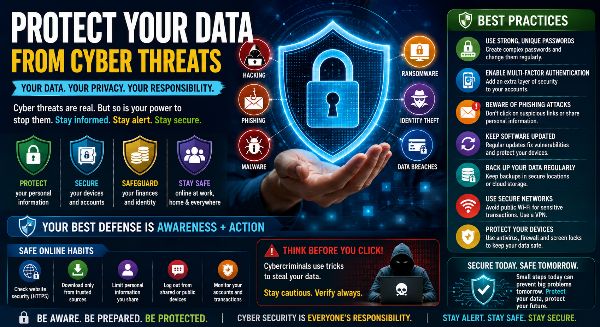
In today’s digital world, data has become one of the most valuable assets for individuals, businesses, and governments. From personal photos and financial records to business documents and confidential information, almost everything is stored digitally. While technology has made life easier, it has also increased the risk of cyber threats such as hacking, phishing, ransomware, malware, identity theft, and data breaches.
Protecting your data is no longer just an IT responsibility—it is a vital life skill. Whether you are a student, employee, entrepreneur, or business owner, understanding how to secure your digital information is essential for maintaining privacy, financial security, and peace of mind.
What Are Cyber Threats?
Cyber threats are malicious attempts to gain unauthorized access to digital systems, networks, or personal information. Cybercriminals use various techniques to steal data, disrupt services, or demand ransom from victims.
Common cyber threats include:
- Phishing attacks
- Malware
- Ransomware
- Spyware
- Identity theft
- Password attacks
- Data breaches
- Social engineering scams
Being aware of these threats is the first step toward protecting your digital life.
Why Data Protection Matters
Every online activity generates digital information. If this data falls into the wrong hands, it can result in financial loss, identity theft, reputational damage, or business disruption.
Protecting your data helps you:
- Prevent cybercrime
- Safeguard personal information
- Protect financial accounts
- Maintain online privacy
- Secure business operations
- Avoid identity theft
- Build trust with customers
- Stay compliant with data protection practices
Strong data protection ensures a safer and more secure digital experience.
Use Strong and Unique Passwords
Passwords are the first layer of defense against cyber threats.
Best practices include:
- Use at least 12–16 characters
- Combine uppercase and lowercase letters
- Include numbers and symbols
- Avoid predictable words
- Never reuse passwords across accounts
- Update passwords regularly
Using a password manager can simplify secure password management.
Enable Multi-Factor Authentication (MFA)
Multi-Factor Authentication adds an additional verification step before granting access to your accounts.
Popular MFA methods include:
- Authentication apps
- SMS verification codes
- Email confirmation
- Fingerprint recognition
- Face recognition
- Security keys
MFA significantly improves account security even if passwords are compromised.
Recognize Phishing Attempts
Phishing is one of the most common methods used by cybercriminals.
Warning signs include:
- Unexpected emails
- Fake login pages
- Urgent requests for personal information
- Unknown attachments
- Misspelled website addresses
- Suspicious QR codes
Always verify messages before clicking links or sharing sensitive information.
Keep Software Updated
Software developers regularly release security updates to fix vulnerabilities.
Update your:
- Operating system
- Web browser
- Antivirus software
- Mobile applications
- Office software
- Smart devices
Automatic updates help protect against newly discovered threats.
Backup Important Data
Data backups protect against accidental deletion, hardware failure, and ransomware attacks.
Follow the 3-2-1 backup rule:
- Keep three copies of important data
- Store backups on two different storage devices
- Keep one backup offsite or in secure cloud storage
Regular backups ensure quick recovery during emergencies.
Secure Your Devices
Protect all digital devices using appropriate security measures.
Recommended practices include:
- Device passwords
- Biometric authentication
- Screen locks
- Full-disk encryption
- Antivirus software
- Remote device tracking
Secure devices reduce the risk of unauthorized access.
Use Safe Internet Practices
Browsing safely helps prevent malware infections and online fraud.
Good habits include:
- Visit HTTPS websites
- Avoid suspicious downloads
- Verify website authenticity
- Ignore unknown pop-ups
- Avoid clicking suspicious advertisements
Safe browsing protects your personal information and devices.
Protect Personal Information
Limit the amount of personal information shared online.
Avoid publicly posting:
- Banking information
- Identity documents
- Home address
- Phone numbers
- Travel plans
- Confidential work information
Privacy-conscious behavior reduces cyber risks.
Secure Your Home Wi-Fi Network
Your home internet connection should also be protected.
Best practices include:
- Change default router passwords
- Enable WPA3 or WPA2 encryption
- Update router firmware
- Disable unused services
- Create separate guest networks
A secure Wi-Fi network protects every connected device.
Be Careful with Public Wi-Fi
Public wireless networks are often vulnerable to cyberattacks.
When using public Wi-Fi:
- Avoid online banking
- Use a Virtual Private Network (VPN)
- Disable automatic file sharing
- Log out after use
- Avoid accessing sensitive business information
Secure connections reduce exposure to cyber threats.
Learn About Ransomware
Ransomware encrypts files and demands payment to restore access.
Reduce the risk by:
- Maintaining backups
- Avoiding suspicious downloads
- Updating software
- Using antivirus protection
- Educating users
Prevention is the best defense against ransomware attacks.
Protect Business Data
Organizations should implement comprehensive cybersecurity practices.
Important measures include:
- Employee awareness training
- Access control
- Data encryption
- Regular backups
- Network monitoring
- Incident response planning
Businesses that prioritize cybersecurity reduce operational and financial risks.
Understand Artificial Intelligence Threats
Artificial Intelligence has introduced new cybersecurity challenges.
Emerging AI-related threats include:
- Deepfake scams
- AI-generated phishing emails
- Voice cloning fraud
- Automated cyberattacks
- Fake customer support interactions
Always verify unusual requests through trusted communication channels.
Practice Good Cyber Hygiene
Cyber hygiene refers to everyday habits that maintain digital security.
Examples include:
- Reviewing account activity
- Updating passwords
- Removing unused applications
- Monitoring financial transactions
- Locking devices
- Staying informed about new cyber threats
Consistent habits significantly improve online safety.
Benefits of Strong Data Protection
Protecting your digital information provides many advantages:
- Greater privacy
- Reduced financial risk
- Better cybersecurity
- Secure online banking
- Improved business continuity
- Protection against identity theft
- Increased confidence online
- Peace of mind
Good security practices benefit both individuals and organizations.
Stay One Step Ahead of Cyber Threats
Cyber threats continue to evolve as technology advances, making data protection more important than ever. Fortunately, many cyberattacks can be prevented by following simple but effective cybersecurity practices.
Using strong passwords, enabling multi-factor authentication, keeping software updated, backing up important files, recognizing phishing attempts, and protecting personal information are all essential steps toward securing your digital life.
Cybersecurity is a shared responsibility. By developing good digital habits and staying informed about emerging threats, you can confidently use technology while protecting your personal data, financial information, and online identity from cybercriminals.