
- July 29, 2026
- Posted by: admin
- Category: Blog
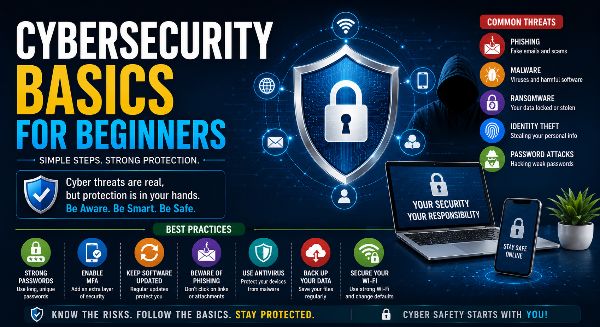
As technology becomes an essential part of everyday life, cybersecurity has become one of the most important skills everyone should understand. Whether you use the internet for studying, shopping, banking, social media, or work, your personal information is constantly exposed to potential cyber threats. Cybercriminals target individuals and organizations through phishing emails, malware, ransomware, identity theft, and data breaches. Fortunately, learning the basics of cybersecurity can help you stay safe online and protect your digital life.
Cybersecurity is not just for IT professionals. Students, employees, business owners, and everyday internet users all benefit from understanding how to recognize threats and practice safe online habits.
What is Cybersecurity?
Cybersecurity is the practice of protecting computers, mobile devices, networks, applications, and digital information from unauthorized access, cyberattacks, and data theft.
Cybersecurity involves:
- Protecting personal data
- Securing online accounts
- Preventing cyberattacks
- Safeguarding financial information
- Maintaining privacy
- Ensuring secure communication
Its primary goal is to keep your digital information safe from hackers and cybercriminals.
Why Cybersecurity is Important
Today, almost every activity involves digital technology. From online banking to cloud storage, personal and business information is stored electronically.
Good cybersecurity helps:
- Prevent identity theft
- Protect financial accounts
- Secure personal information
- Avoid online scams
- Protect business data
- Build trust online
- Reduce financial losses
- Ensure safe internet usage
Simple cybersecurity practices can prevent many common online threats.
Common Cyber Threats
Understanding common cyber threats helps you recognize potential dangers before they cause harm.
Some of the most common threats include:
Phishing
Phishing attacks trick users into revealing passwords, banking details, or personal information through fake emails, websites, or messages.
Malware
Malware is harmful software designed to damage devices or steal information.
Examples include:
- Viruses
- Worms
- Trojans
- Spyware
- Adware
Ransomware
Ransomware locks or encrypts files and demands payment to restore access.
Regular backups are one of the best defenses against ransomware.
Identity Theft
Cybercriminals steal personal information to commit fraud, open accounts, or make unauthorized purchases.
Password Attacks
Weak or reused passwords make online accounts easy targets for hackers.
Create Strong Passwords
A strong password is your first line of defense.
Good password practices include:
- Use 12–16 characters or more
- Combine uppercase and lowercase letters
- Include numbers and symbols
- Avoid personal information
- Use different passwords for every account
- Change passwords periodically
Password managers can help generate and securely store complex passwords.
Enable Multi-Factor Authentication (MFA)
Multi-Factor Authentication adds an extra layer of protection beyond your password.
Common MFA methods include:
- Authentication apps
- SMS verification codes
- Email verification
- Fingerprint recognition
- Face recognition
- Hardware security keys
MFA significantly reduces the risk of unauthorized account access.
Keep Software Updated
Software updates often contain important security patches.
Update regularly:
- Operating systems
- Mobile apps
- Browsers
- Antivirus software
- Office software
- Smart devices
Automatic updates help protect against newly discovered vulnerabilities.
Browse the Internet Safely
Safe browsing habits help prevent cyberattacks.
Always:
- Visit HTTPS websites
- Verify website addresses
- Download software from trusted sources
- Avoid suspicious advertisements
- Ignore unknown pop-ups
Careful browsing reduces exposure to malware and phishing scams.
Recognize Phishing Emails
Phishing emails often appear genuine but are designed to steal information.
Warning signs include:
- Urgent requests
- Poor grammar
- Unknown senders
- Suspicious links
- Unexpected attachments
- Requests for passwords or banking details
Never click suspicious links without verifying their authenticity.
Protect Personal Information
Avoid sharing unnecessary personal information online.
Limit public access to:
- Phone numbers
- Home addresses
- Identity documents
- Financial information
- Travel plans
- Workplace details
Protecting your privacy reduces cyber risks.
Install Antivirus Software
Reliable antivirus software helps detect and remove malicious programs.
Antivirus solutions protect against:
- Viruses
- Malware
- Spyware
- Ransomware
- Trojans
Keep your antivirus software updated for maximum protection.
Secure Your Wi-Fi Network
Your home network should be properly secured.
Best practices include:
- Change default router passwords
- Enable WPA3 or WPA2 encryption
- Update router firmware
- Create guest Wi-Fi for visitors
- Disable unnecessary services
Secure networks protect every connected device.
Backup Important Files
Unexpected cyber incidents can result in permanent data loss.
Maintain regular backups by:
- Using cloud storage
- Saving files to external drives
- Following the 3-2-1 backup strategy
- Testing backup recovery
Backups make recovery much easier after ransomware or hardware failures.
Practice Safe Social Media Habits
Social media can expose personal information if used carelessly.
Stay safe by:
- Reviewing privacy settings
- Avoiding oversharing
- Accepting requests only from trusted people
- Reporting fake accounts
- Enabling account security features
Responsible social media use helps protect your digital identity.
Learn Basic Cyber Hygiene
Cyber hygiene refers to everyday habits that improve online security.
Good habits include:
- Locking devices
- Logging out from shared computers
- Reviewing account activity
- Removing unused applications
- Monitoring financial transactions
- Staying informed about new cyber threats
Consistent cyber hygiene strengthens long-term security.
Cybersecurity in the Workplace
Employees play a vital role in protecting organizational data.
Businesses should encourage:
- Employee awareness training
- Secure password policies
- Access control
- Data encryption
- Secure remote work
- Incident reporting
A cyber-aware workforce reduces organizational risk.
Benefits of Learning Cybersecurity Basics
Understanding cybersecurity offers numerous advantages:
- Better online safety
- Stronger privacy protection
- Reduced financial risk
- Secure digital communication
- Improved confidence online
- Protection against cybercrime
- Better career opportunities
- Responsible technology use
Cybersecurity knowledge is valuable in every profession.
Build a Safer Digital Future
Cybersecurity is no longer an optional skill—it is an essential part of modern life. Every internet user has a responsibility to protect personal information, use technology safely, and remain alert to evolving cyber threats.
By creating strong passwords, enabling multi-factor authentication, keeping software updated, recognizing phishing scams, securing devices, and practicing responsible online behavior, you can significantly reduce your risk of becoming a victim of cybercrime.
Whether you are a student, professional, entrepreneur, or simply someone who uses the internet every day, learning cybersecurity basics is an investment in your safety, privacy, and future success.