
- July 23, 2026
- Posted by: admin
- Category: Blog
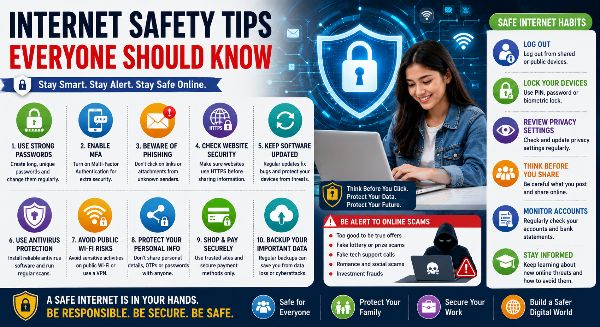
The internet has transformed the way we learn, work, communicate, shop, and manage our daily lives. From online banking and digital payments to social media, cloud storage, remote work, and virtual education, the internet has become an essential part of modern living. However, as our dependence on digital technology grows, so do the risks associated with cybercrime, identity theft, online scams, phishing attacks, and data breaches.
Understanding internet safety is no longer optional—it is a necessary life skill for people of all ages. Whether you are a student, professional, entrepreneur, or senior citizen, following basic internet safety practices can protect your personal information, financial assets, and digital identity.
Why Internet Safety Matters
Every day, millions of people access websites, download files, make online payments, and share personal information. Cybercriminals constantly look for opportunities to exploit security weaknesses.
Practicing internet safety helps you:
- Protect personal information
- Prevent identity theft
- Avoid online scams
- Secure financial transactions
- Protect your devices
- Safeguard digital accounts
- Build confidence online
- Reduce cybersecurity risks
Safe online habits contribute to a more secure digital environment for everyone.
Create Strong and Unique Passwords
Passwords are your first line of defense against unauthorized access.
Follow these best practices:
- Use at least 12–16 characters
- Include uppercase and lowercase letters
- Add numbers and special symbols
- Avoid personal information
- Never reuse passwords
- Change passwords regularly
Using a trusted password manager can help generate and store strong passwords securely.
Enable Multi-Factor Authentication (MFA)
Multi-Factor Authentication provides an extra layer of security by requiring additional verification beyond your password.
Common MFA methods include:
- Authentication apps
- SMS verification codes
- Email verification
- Fingerprint recognition
- Face recognition
- Security keys
MFA significantly reduces the risk of account compromise.
Beware of Phishing Attacks
Phishing is one of the most common online scams.
Watch for:
- Suspicious emails
- Fake login pages
- Fraudulent websites
- Unexpected attachments
- Urgent payment requests
- Fake customer support messages
Always verify the sender before clicking links or downloading files.
Browse Only Secure Websites
Before entering personal information, ensure the website is secure.
Look for:
- HTTPS in the web address
- Lock icon in the browser
- Trusted website certificates
Avoid sharing sensitive information on unsecured websites.
Keep Your Software Updated
Software updates often fix important security vulnerabilities.
Regularly update:
- Operating systems
- Mobile applications
- Web browsers
- Antivirus software
- Smart devices
Automatic updates provide the best protection against emerging threats.
Install Reliable Antivirus Software
Antivirus software helps detect and remove malicious programs.
Good security software protects against:
- Viruses
- Malware
- Spyware
- Ransomware
- Trojans
- Adware
Keep antivirus definitions updated for maximum protection.
Protect Your Personal Information
Be cautious about what you share online.
Avoid publicly posting:
- Home address
- Phone number
- Identity documents
- Banking information
- Passwords
- Travel plans
Protecting personal information reduces the risk of identity theft.
Use Safe Public Wi-Fi Practices
Public Wi-Fi networks are often less secure than private connections.
When using public Wi-Fi:
- Avoid online banking
- Use a Virtual Private Network (VPN)
- Disable file sharing
- Log out after use
- Avoid accessing confidential information
Secure browsing protects your sensitive data.
Think Before You Click
Cybercriminals often trick users into clicking malicious links.
Before clicking:
- Verify website URLs
- Check email sender addresses
- Avoid unknown downloads
- Ignore suspicious advertisements
- Confirm unexpected messages
A few extra seconds of caution can prevent major security problems.
Shop Online Safely
Online shopping continues to grow rapidly.
Protect yourself by:
- Buying from trusted retailers
- Reading customer reviews
- Using secure payment methods
- Avoiding deals that seem too good to be true
- Monitoring bank transactions
Secure shopping practices reduce financial risks.
Protect Your Social Media Accounts
Social media platforms contain valuable personal information.
Improve security by:
- Adjusting privacy settings
- Limiting public posts
- Accepting requests only from trusted people
- Avoiding oversharing
- Reporting fake profiles
Managing privacy helps protect your digital identity.
Backup Important Data
Unexpected cyberattacks or hardware failures can result in data loss.
Regularly back up:
- Documents
- Photos
- Videos
- Financial records
- Business files
- Educational materials
Cloud storage and external drives provide reliable backup options.
Recognize Online Scams
Scammers use many techniques to deceive internet users.
Common scams include:
- Lottery scams
- Investment fraud
- Fake job offers
- Romance scams
- Tech support scams
- Charity fraud
Always verify offers before sharing money or personal information.
Teach Children Safe Internet Habits
Children spend increasing amounts of time online.
Parents should educate children about:
- Safe browsing
- Stranger danger
- Privacy settings
- Responsible social media use
- Reporting inappropriate content
- Screen time management
Digital education helps young users build lifelong online safety habits.
Understand AI-Driven Cyber Threats
Artificial Intelligence has introduced new cybersecurity challenges.
Emerging threats include:
- AI-generated phishing emails
- Voice cloning scams
- Deepfake videos
- Fake customer support bots
- AI-powered fraud
Verify unusual requests through trusted communication channels before taking action.
Build Good Digital Habits
Internet safety depends on consistent daily practices.
Develop habits such as:
- Logging out of shared devices
- Locking your devices
- Reviewing privacy settings regularly
- Monitoring account activity
- Using secure networks
- Staying informed about new cyber threats
Small habits make a significant difference in long-term online security.
Benefits of Internet Safety
Practicing internet safety provides numerous advantages:
- Better privacy protection
- Reduced financial fraud
- Safer online transactions
- Improved digital confidence
- Stronger account security
- Protection against identity theft
- Secure communication
- Peace of mind
Safe internet usage benefits individuals, families, businesses, and communities.
Stay Safe in the Digital World
The internet offers incredible opportunities for learning, communication, entertainment, and business. However, it also requires users to remain alert and responsible. Cyber threats continue to evolve, making internet safety an essential skill for everyone.
By creating strong passwords, enabling multi-factor authentication, protecting personal information, recognizing online scams, keeping software updated, and practicing responsible digital behavior, you can greatly reduce the risks associated with online activities.
Internet safety is not about avoiding technology—it is about using technology wisely. With the right knowledge and habits, you can confidently enjoy everything the digital world has to offer while protecting yourself, your family, and your valuable information.